Free tool
Free ID Photo Maker Online – Create ID Photos in Minutes
Make an ID photo online from your phone or computer. Free preview, correct 2x2 inch (51x51 mm) crop and head size, then a print-ready download.
- Last updated
ID photo maker
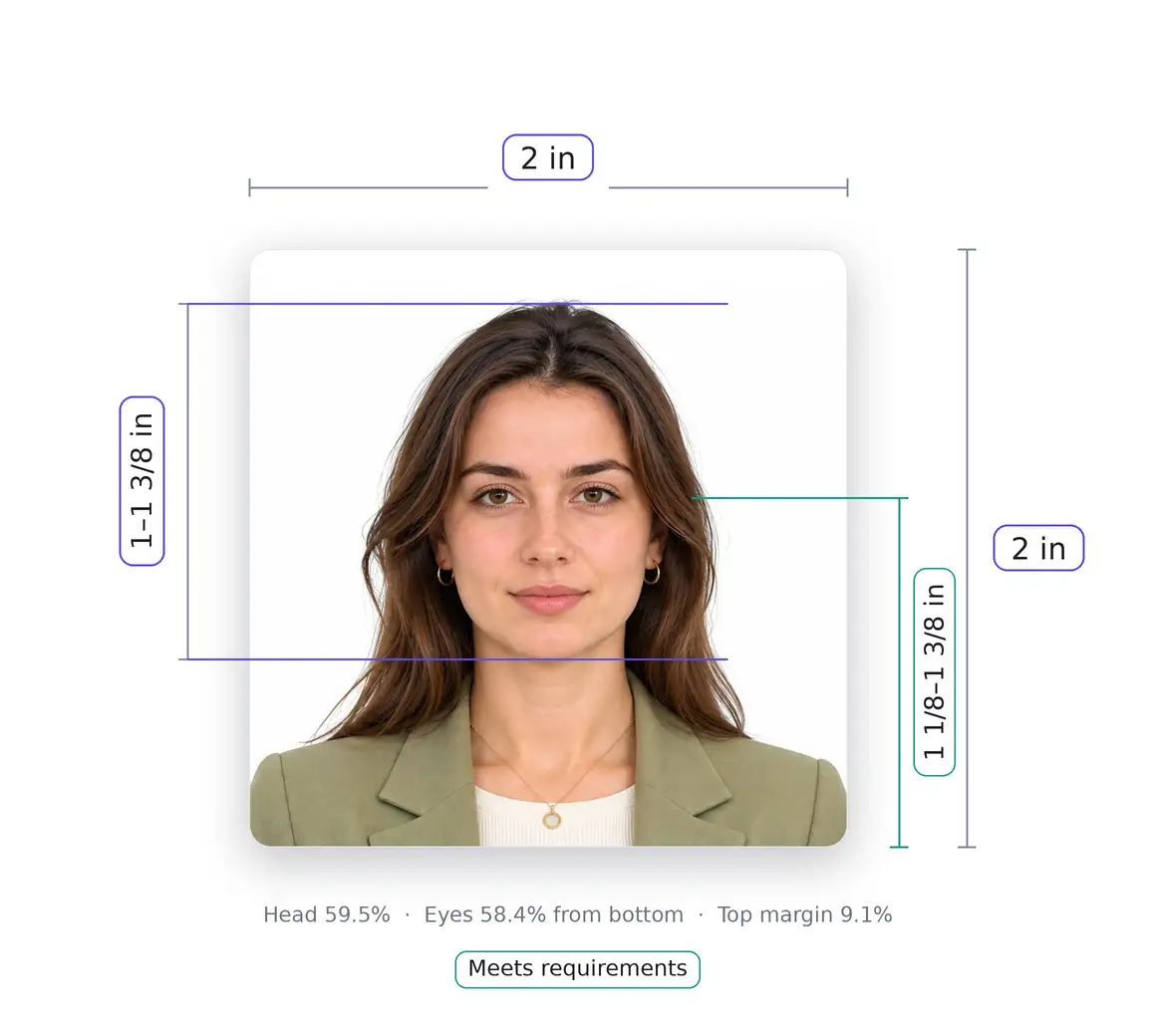
An ID photo is a plain, front-facing photo of your face for an identity document. Upload a picture above and the online ID photo maker crops it to a square 2 × 2 inch (51 × 51 mm) photo with your head at the right size, so you can check it and download it without visiting a photo studio.
How to Create an ID Photo Online for Free
You can preview your ID photo for free, with no account. Downloading the finished photo is a one-time paid download (see our refund policy).
How to create an ID photo online using your phone
Prop your phone at eye level, face a window for even daylight, and stand in front of a plain white or off-white wall. Take a front-facing photo, then upload it from your phone's gallery. Your browser re-saves the picture before uploading, which also removes hidden metadata such as GPS location.
How to make a professional ID picture from a regular photo
A regular photo works if it is recent, sharp, front-facing and evenly lit, with your full face in view and a neutral expression. Photos with filters, retouching, glasses or shadows are a poor starting point, because the maker crops and sizes your picture but can't fix photos that break the rules.
How to take an ID photo online without visiting a photo studio
For a U.S. passport, you can take your own photo or have a friend or family member take it, then print it on matte or glossy photo-quality paper. Upload the picture, check the crop, and download the result. Some documents don't allow this, so see how to create a US ID photo online.
How to create an ID photo for free using an online photo maker
Upload your picture, keep the format that matches your document, and review the free preview. The photo is uploaded over an encrypted connection, because face detection and background checks run on a server. Your result page expires after 7 days; the privacy policy explains what is stored.
How to Use a Free Online ID Photo Maker
How to use an online ID photo maker step by step
Upload a picture, pick the ID photo type, crop and position your face, check the result and download it. Each stage is explained in How to Make an ID Photo Online: Step-by-Step below.
How to upload and edit your picture for an ID card
Choose a clear photo from your phone or computer. If your document uses a different size, choose the country in the passport photo editor. Processing can take up to a minute.
How to crop and adjust your face in an ID photo editor
Your face should be centered and looking straight at the camera. For U.S. passport-style photos, the head must measure 1 to 1⅜ inches (25–35 mm) from the bottom of the chin to the top of the head. In a 600 × 600 pixel photo, that is roughly 300 to 413 pixels, or 50–69% of the photo's height. The editor measures your head and crops to fit this range.
How to download your finished ID photo online
Your result opens on its own page with your head height and position measured, so you can check the crop before you print or upload it. Download the finished image, or place it on a printable sheet.
ID Photo Size, Dimensions and Requirements
There is no single ID photo size. The issuer of each document sets its own, so check the rules for your document first. For U.S. passport-style photos, the Department of State sets these numbers.
| Item | U.S. passport-style photo |
|---|---|
| Size | 2 × 2 in (51 × 51 mm), square |
| Pixels at 300 DPI | 600 × 600 px |
| Head height | 1 to 1⅜ in (25–35 mm), chin to top of head |
| Background | White or off-white, no shadows, texture or lines |
| Expression | Neutral, both eyes open, mouth closed |
| Photo age | Taken within the last 6 months |
What is the standard ID photo size in the USA?
For a U.S. passport, the standard is 2 × 2 inches (51 × 51 mm). Other U.S. IDs don't share one national photo size, so a driver's license, a work badge and a school card can each follow different rules.
How to make a 2x2 ID photo online
A 2x2 photo is 2 inches wide and 2 inches tall. At 300 dots per inch (DPI), that is 2 × 300 = 600 pixels on each side. A 600 × 600 pixel file printed at 300 DPI comes out at exactly 2 × 2 inches. For online visa forms, the digital file must be square, from 600 × 600 to 1200 × 1200 pixels, in JPEG format and sRGB color, and no larger than 240 kB. Use the 2x2 photo maker for the full size guide.
How to create a 1x1 ID picture online
A 1x1 picture is a square photo 1 inch (25.4 mm) wide and tall, which is 300 × 300 pixels at 300 DPI. This page doesn't cite an official U.S. standard for 1x1 photos, so don't assume the 2 × 2 inch head-height range scales down. Read the instructions from the organization that asked for the photo and follow its size and head-height rules.
What are the background, face positioning and lighting requirements for ID photos?
- Background: plain white or off-white, without shadows, texture or lines.
- Face position: look straight at the camera without tilting your head, with your full face in view.
- Lighting: use even light on your face. Overhead lights or lights far to one side can cast shadows, and light that is too bright or too dim spoils the exposure.
- Glasses: U.S. passport photos don't allow them, unless you can't remove them for a medical reason and include a signed note from your doctor.
- Head coverings: allowed only for religious or medical reasons with a signed statement, and they can't cast shadows or hide your face.
Our passport photo requirements checklist covers every rule in detail.
How to Edit and Customize an ID Photo Online
How to change the background of an ID photo
For a U.S. passport photo, the background must be white or off-white without shadows, texture or lines, and the Department of State doesn't allow changing a photo with software, apps, filters or AI. The most reliable fix is a retake against a plain wall.
How to resize and crop an ID picture online
Cropping and resizing are fine for U.S. passport photos. The editor crops your picture to a square and sizes your head within the allowed range. Head size is the most common problem in home photos: stand too close and your head is too big, stand too far back and it's too small.
How to create a formal ID picture using an online editor
Wear plain clothing that contrasts with the background. For a U.S. passport photo, don't wear a uniform, clothing that looks like a uniform, or camouflage, and don't wear headphones or wireless hands-free devices. Keep a neutral expression, with both eyes open and your mouth closed.
How to improve ID photo lighting and remove unwanted shadows
Face a window with indirect daylight and stand a short distance in front of the wall, so your shadow doesn't land on it. Avoid ceiling lights directly above you. Editing can't remove shadows reliably, so retake the photo if you see them.
Create Different Types of ID Photos Online
How to create a US ID photo online
"US ID photo" covers several documents, and they don't follow the same rules.
USCIS changed its photo policy on December 12, 2025. For requests filed on or after that date, it no longer accepts self-submitted photos, and photos are taken by USCIS or an authorized entity. Printed form instructions may not reflect this yet, so follow the current instructions for your form on uscis.gov, not an old printout.
How to make a passport ID photo online
You can take or buy your own photo for a U.S. passport. It must be printed on matte or glossy photo-quality paper, and photocopies and scans aren't accepted. For digital visa uploads, use a square JPEG in sRGB color, from 600 × 600 to 1200 × 1200 pixels and no larger than 240 kB. The embassy or consulate makes the final decision on acceptance.
How to create a driver's license photo online
Many driver's license photos are taken by the DMV at the office, and rules vary by state. New York, for example, tells people without a photo license or ID that they must visit a DMV office to have their photo taken at no charge. Check your state's DMV website before you prepare a photo yourself.
How to make an ID card photo for work, school or other applications
Employers and schools set their own photo rules, such as size, background color and file format. Ask the issuer for its specification before you upload anything, then check the maker's result against it.
How to Print an ID Photo Online
The editor downloads a single 600 × 600 pixel photo. Print it on matte or glossy photo-quality paper.
How to print an ID photo at home
Print at actual size with no scaling, because "fit to page" changes the dimensions. Measure one printed photo with a ruler before you cut: it must be exactly 2 inches on each side. Photocopies and scans of a photo aren't accepted for U.S. passports.
How to arrange multiple ID photos on a 4x6 photo sheet
Place copies on a 4 × 6 inch canvas in any photo editor, then order a standard 4 × 6 print at a pharmacy or print shop, or print it at home. A 4 × 6 inch print holds six 2x2 photos, two across and three down, because 4 ÷ 2 = 2 and 6 ÷ 2 = 3. With six photos there's no space between them. Most applications need one or two photos, so a sheet with two photos and wide margins is easier to cut. Our guide to printing passport photos gives exact layouts for two, four and six photos.
How to print a 2x2 ID photo in the correct dimensions
At 300 DPI, a 600 × 600 pixel file prints at exactly 2 × 2 inches. A larger square file, such as 1200 × 1200, prints at the same size if your printer scales it to 2 inches. Turn off "fit to page" and any automatic scaling.
How to save an ID photo for professional printing
Keep the original 600 × 600 pixel file and send it to the print shop without resizing, so the shop doesn't scale it. Tell them to print at 2 × 2 inches, and measure one print before you leave.
Common ID Photo Problems and How to Fix Them
Why does my ID photo look blurry or stretched?
Blurry photos usually come from a low-resolution or heavily compressed original. Retake the photo in good light and don't enlarge a small image. Stretching comes from a non-square crop or from a print scaled with "fit to page", so use a square file and print at actual size.
How to fix incorrect ID photo dimensions
Check the size of your file and your print. A U.S. passport-style photo must be a square 2 × 2 inches (51 × 51 mm), which is 600 × 600 pixels at 300 DPI, with the head 1 to 1⅜ inches (25–35 mm) tall. If your head is too big, you were too close to the camera. If it's too small, you were too far away. Retake the photo from a better distance.
How to remove shadows and uneven backgrounds from an ID picture
Shadows on your face or on the wall are the most common reason for rejection, and editing can't fix them reliably. Face a window with indirect daylight, step away from the wall, and avoid ceiling lights directly above you. Then retake the photo.
How to make an ID photo look professional and natural
Use a neutral expression, plain clothing and even light. Don't retouch the photo or use filters, skin smoothing or AI changes, which U.S. passport photos don't accept. Cropping and resizing are fine.
How to Make an ID Photo Online: Step-by-Step
- Upload your picture: Choose a clear, front-facing photo from your phone or computer.
- Select ID photo type: Choose the required format, such as U.S. ID, passport ID or another ID card format.
- Adjust your photo: Crop the image, position your face and resize it according to the selected requirements.
- Check the background: A plain white or off-white wall with no shadows, texture or lines is what U.S. passport photos need. If yours doesn't have that, retake the photo instead of editing it.
- Check your photo: Review face positioning, lighting, image quality and dimensions.
- Download your ID photo: Save the finished image or prepare a printable photo sheet.
This page's tool helps you prepare a photo that follows published size and head-height rules. It can't guarantee acceptance: the agency or organization that receives your application makes the final decision, and photo specifications vary by issuing authority and document type. Always check the official requirements for your document.
Supported countries
65 photo specs. The size shown is the pixel size of the finished photo.
- Algeria413 × 531
- Argentina945 × 945
- Australia413 × 531
- Austria413 × 531
- Bahrain945 × 1417
- Belgium413 × 531
- Bhutan413 × 531
- Brazil591 × 827
- Brazil (3 × 4 foto)354 × 472
- Bulgaria413 × 531
- Canada1200 × 1800
- China420 × 560
- Colombia709 × 945
- Croatia413 × 531
- Czechia413 × 531
- Denmark413 × 531
- Estonia1300 × 1600
- Finland500 × 653
- France630 × 810
- Germany413 × 531
- Greece413 × 531
- Hong Kong1280 × 1600
- Hungary413 × 531
- Iceland827 × 1063
- India630 × 810
- Indonesia400 × 600
- Iran600 × 400
- Iraq413 × 531
- Ireland715 × 951
- Italy413 × 531
- Japan827 × 1063
- Kazakhstan413 × 531
- Latvia413 × 531
- Lithuania413 × 531
- Luxembourg413 × 531
- Malawi413 × 531
- Malaysia827 × 1181
- Malta413 × 531
- Mexico413 × 531
- Nepal413 × 531
- Netherlands413 × 531
- New Zealand900 × 1200
- Nigeria600 × 800
- Norway413 × 531
- Peru413 × 531
- Philippines827 × 1063
- Poland413 × 531
- Portugal413 × 531
- Romania413 × 531
- Schengen visa630 × 810
- Singapore400 × 514
- Slovakia413 × 531
- Slovenia413 × 531
- South Africa413 × 531
- South Korea413 × 531
- Spain413 × 531
- Sri Lanka413 × 531
- Sweden413 × 531
- Switzerland413 × 531
- Tajikistan413 × 531
- Thailand413 × 531
- Turkey591 × 709
- United Arab Emirates413 × 531
- United Kingdom600 × 750
- United States600 × 600
Frequently Asked Questions
How can I make an ID photo online for free?
Upload a front-facing picture and preview the cropped ID photo for free, with no account. Downloading the finished photo is a one-time paid download (see our refund policy). Start with a sharp photo taken in even light against a plain wall, because the maker crops and sizes your picture but can't fix shadows or glasses.
What is the best free online ID photo maker?
The best one is the tool that matches your document's rules. For a U.S. ID photo, look for an editor that outputs a square 2 × 2 inch (51 × 51 mm) photo at 600 × 600 pixels and measures your head height, so you can check the crop before you print or upload it.
Can I take an ID photo using my phone?
Yes. Prop the phone at eye level, face a window for even daylight, and stand in front of a plain white or off-white wall. Then upload the picture to the ID photo maker. You don't need a photo studio.
How do I make a 2x2 ID photo online?
Upload your picture, keep the United States format selected, and check the result. The editor produces a square 600 × 600 pixel photo that prints at exactly 2 × 2 inches. See our 2x2 photo maker for the full size guide.
Can I create a US ID photo online?
Yes, for documents that accept a photo you provide, such as a U.S. passport. Some U.S. IDs work differently: many driver's licenses are photographed at the DMV office, and USCIS has changed how it collects photos. See how to create a US ID photo online.
How can I change the background of my ID photo?
The simplest way is to take the photo against a plain white or off-white wall with no shadows. For U.S. passport photos, the Department of State doesn't allow changing a photo with software, apps, filters or AI, so a retake is safer than editing.
Can I edit my ID picture without downloading software?
Yes. The editor runs in your browser: upload, crop, check and download. Cropping and resizing are fine. Retouching, filters and AI changes are not accepted for U.S. passport photos.
How do I print an ID photo at home?
Print on photo-quality paper at actual size with no scaling (turn off "fit to page"), then measure the print with a ruler: a 2x2 photo must be exactly 2 inches on each side. Our guide to printing passport photos shows layouts for a 4 × 6 inch sheet.
What is the difference between an ID photo and a passport photo?
"ID photo" is a general term for a photo used on an identity document, and each issuer sets its own size and rules. A U.S. passport photo is one specific ID photo: 2 × 2 inches (51 × 51 mm) with the head 1 to 1⅜ inches (25–35 mm) tall. Other IDs may differ.
Is an online ID photo maker suitable for official documents?
It can help you prepare a photo that follows published size and head-height rules, but no tool can promise acceptance. The agency or issuer that receives your application makes the final decision, and rules differ by document type.
Sources
Official references this page was checked against.
- U.S. Passport Photos — U.S. Department of State
- Photo Requirements (U.S. visas) — U.S. Department of State
- Digital Image Requirements (U.S. visas) — U.S. Department of State
- Instructions for Form I-485, Application to Register Permanent Residence or Adjust Status — U.S. Citizenship and Immigration Services
- Policy Alert PA-2025-29: Photograph Reuse for Identity Documents — U.S. Citizenship and Immigration Services
- Request for Photo Image (Form ID-5) — New York State Department of Motor Vehicles
Related pages
- tool
2x2 Photo Maker: Make a 2 Inch by 2 Inch Photo Online
Make a 2 × 2 inch photo for U.S. passports, visas and green cards.
- tool
Passport photo editor
Crop, size and check a passport photo for the U.S. and 60+ other countries.
- guide
U.S. passport photo requirements: a complete checklist
Every U.S. passport photo rule in one place — size, head height, background, glasses, expression, clothing, and printing — with links to the official sources.